This entry is for front-end engineers and technical founders who are picking a storefront for Shopify, or who run a Liquid theme or an older Hydrogen app and want to know what Vercel Shop changes. You need basic Next.js and a Shopify store, or the patience to follow the sandbox route below.
Vercel Shop is an open-source Next.js 16 storefront template for Shopify. Shopify keeps the catalog, cart, checkout and payments. The template adds the storefront in front of them, plus a layer for AI agents: Markdown pages, /llms.txt, structured data, Shopify's agent commerce endpoints and eight agent skills for extending the shop. Vercel announced it as generally available in Vercel and Shopify make agents first-class shoppers.
I ran it end to end with a coding agent, took screenshots before and after, and read what a crawler and an AI agent actually receive. The short version:
- Setup is small. One
create-next-appcommand, three environment variables, Node 26 and pnpm 12. Dependencies installed in about 11 seconds. - The skills are the product's most interesting part.
pnpm dlx skills add vercel/shop --skill '*' --yesinstalled all eight and linked them for Claude Code. One of them,enable-shopify-menus, rebuilt the navigation and footer from Shopify's menus. A separate front-end design skill took the default storefront to a distinct brand in 20 files, and I checked the result with screenshots, keyboard focus, reduced motion and contrast ratios. - Agent-readiness is built in, and mostly correct. Product pages answer
Accept: text/markdown,/llms.txtis generated from the catalog, and robots and the sitemap are sensible. The product structured data is thin: no return policy, no shipping details, no variant model. - Whether to use it is a team question. It pays off when you have Next.js skills and want control over UX, speed and the agent surface. A theme is cheaper if you do not.
- 8agent skills installed in one command
- 20files changed for the redesign and the menus skill
- 44 sproduction build
- ~142xsmaller product page as Markdown than as HTML
- 6.3:1lowest text contrast in the new palette
- 0animated nodes with reduced motion on
All six numbers are from my sandbox run against a 10-product test catalog. The Markdown ratio is 1,476 bytes against 209,822 bytes for the same product URL, and the contrast ratio is for secondary text on the page background.
What Vercel Shop is
#The repository's own description is a useful way to read it: three owners, and every feature belongs to exactly one.
| Owner | Owns | Lives in |
|---|---|---|
| Shopify | Catalog, cart state, checkout, customer accounts, predictive search, policies, analytics | lib/shopify/**, lib/cart/**, handlers in proxy.ts |
| Next.js | Routing, Server Components, caching, metadata, and the answer-engine surface (Markdown, llms.txt, JSON-LD, sitemap) | app/, components/, lib/seo/**, lib/markdown/** |
| Eve | The optional Shop Agent: sessions, tools, model | agent/, components/agent/ |
flowchart LR
  Shopper["Shopper's browser"] --> Next["Next.js app on Vercel"]
  Crawler["Search crawler or AI agent"] -->|"HTML, Markdown, llms.txt"| Next
  Next -->|"Storefront API through the Hydrogen SDK"| Shopify["Shopify: catalog, cart, checkout, payments"]
  Next --> Eve["Eve: optional Shop Agent"]
  Eve -->|"catalog search and cart handlers"| Shopify
  Crawler -->|"UCP and MCP endpoints"| Shopify
Two details matter if you are deciding. First, it uses Shopify's framework-agnostic Hydrogen SDK, not the Hydrogen React Router framework. Vercel and Shopify rebuilt the SDK together, and the Hydrogen 2026.10 release is what the template runs on. Second, if you came from Next.js Commerce, its repository now says development has moved to vercel/shop.
Checkouts are ridiculously hard to get right. It's one of those pieces of software that actually does need 20 years of tinkering with.
Tobias Lütke, Shopify CEO, quoted in Vercel's announcement
That is the case for keeping checkout on Shopify, and it is how the template is built. Card details never touch the storefront.
Vercel also cites a customer result: when PAIGE rebuilt its store on Shopify, Next.js and Vercel, it reported 22% more revenue and 76% higher conversion over Black Friday and Cyber Monday, with no downtime. That is a vendor case study about the stack, not a measurement of this template, so read it as context.
What you get out of the box
#From the documentation and the repository:
- Product, collection and search pages from the Storefront API, plus blog, page and policy content from Shopify.
- A server-backed cart with a hand-off to Shopify Checkout, and a Shop Pay button on the product page.
- Partial prerendering with tagged caches that Shopify webhooks invalidate.
- SEO metadata, a sharded sitemap, robots rules and JSON-LD.
- Markdown representations of pages,
/llms.txt, and forwarding to Shopify's Universal Commerce Protocol (UCP) endpoints. - Opt-in pieces, all off by default: customer accounts, Shopify analytics and consent, BotID, and the Shop Agent.
It is a single-locale storefront by default. Markets and translations arrive through skills.
What I tested and what I did not
#I want this to be usable as evidence, so here is the boundary.
Warning: I had no live Shopify store in the sandbox, so every Shopify response in the screenshots comes from a local stand-in, not from a real store.
What was real: the template at release 2026.11.0 (commit 55a2cc3), Node 26.13.0, pnpm 12.16.1, Next.js 16.4.3, TypeScript 7, the Hydrogen 2026.10.2 SDK, the skills CLI, the template's own lint and typecheck, a production build, and every response the running app sent to a browser or to curl.
What was simulated: the Shopify Storefront API (details in step 2), the product images and the hero artwork (illustrations I generated for a fictional brand, Fieldnote Supply), and Shopify Checkout, which I only reached as a hand-off URL. The two typefaces are self-hosted from open-licensed (OFL) packages, so the redesign makes no third-party font requests.
What I did not run: the Shop Agent, which needs AI Gateway access; /.well-known/ucp and the UCP MCP endpoint, which Shopify serves; customer accounts; webhooks; and the browser Add to Cart button, because it depends on a Shopify-hosted script that my sandbox network most likely blocks. I note where that mattered.
Step 1: Create the project
#The package manifest pins Node 26 and pnpm 12.16.1. The README still says Node 24 in one place, so trust package.json.
pnpm create next-app@latest my-store --example https://github.com/vercel/shop
cd my-store
There are two other ways in. The Deploy with Vercel button creates the repository, a Vercel project and a new Shopify store through the Vercel Marketplace integration. The create-vercel-shop package on npm is a third entry point that the Vercel template page mentions; I did not use it.
The project arrives with AGENTS.md, the skills in .agents/skills/ and a .claude/skills link for Claude Code:
my-store/
  AGENTS.md           rules every coding agent reads first
  .agents/skills/     8 storefront skills
  app/                routes: products, collections, search, cart, md, llms.txt, sitemap
  components/         nav, footer, product, cart, agent, schema, ui
  lib/                shopify, cart, product, collections, seo, markdown, config
  agent/              Eve tools for the optional Shop Agent
  proxy.ts            Hydrogen route handlers: cart, search, UCP forwarding
Step 2: Connect Shopify, or fake it
#With a store, the setup is three values. In Shopify admin, install the Headless sales channel, create a storefront and copy its public access token. Grant the Storefront API permissions the docs list. The shop ID is the number in https://shopify.com/123456789/account.
NEXT_PUBLIC_SHOPIFY_STORE_DOMAIN="your-store.myshopify.com"
NEXT_PUBLIC_SHOPIFY_STOREFRONT_ACCESS_TOKEN="your-token"
NEXT_PUBLIC_SHOPIFY_SHOP_ID="123456789"
Tip: Publish your products to the Headless channel, or to the Vercel Storefronts channel if the store came from the Deploy button. Otherwise the home page is empty. The docs warn that the first deployment runs before the store has products, so redeploy after publishing.
No store yet? Here is what I did
Hydrogen ships Shopify's real Storefront API schema inside the package, as @shopify/hydrogen/dist/storefront.schema.json. I wrote a 400-line GraphQL server that loads that schema, serves ten fictional products, four collections, two menus and an in-memory cart, and rejects any query that Shopify's schema would reject. That second part is what makes it useful: when the template asked for a field I had not modelled, the mock failed the same way Shopify would, and I fixed the data instead of guessing.
Two settings pointed the template at it. Hydrogen accepted a full URL as the store domain, and the template has a built-in switch, V0_CALLBACK_URL, that sets images.unoptimized, so product images can come from localhost.
NEXT_PUBLIC_SHOPIFY_STORE_DOMAIN="http://localhost:4010"
NEXT_PUBLIC_SHOPIFY_STOREFRONT_ACCESS_TOKEN="mock-public-token-0000000000000000"
NEXT_PUBLIC_SHOPIFY_SHOP_ID="123456789"
V0_CALLBACK_URL=1 pnpm devThe mock leaves Hydrogen's compact variant-availability strings empty, so the variant picker falls back to the variants it has. A real store sends them. None of this is needed once you have a store.
Step 3: Run it and read the product page
#pnpm dev was ready in about half a second. This is the product page of the untouched template.
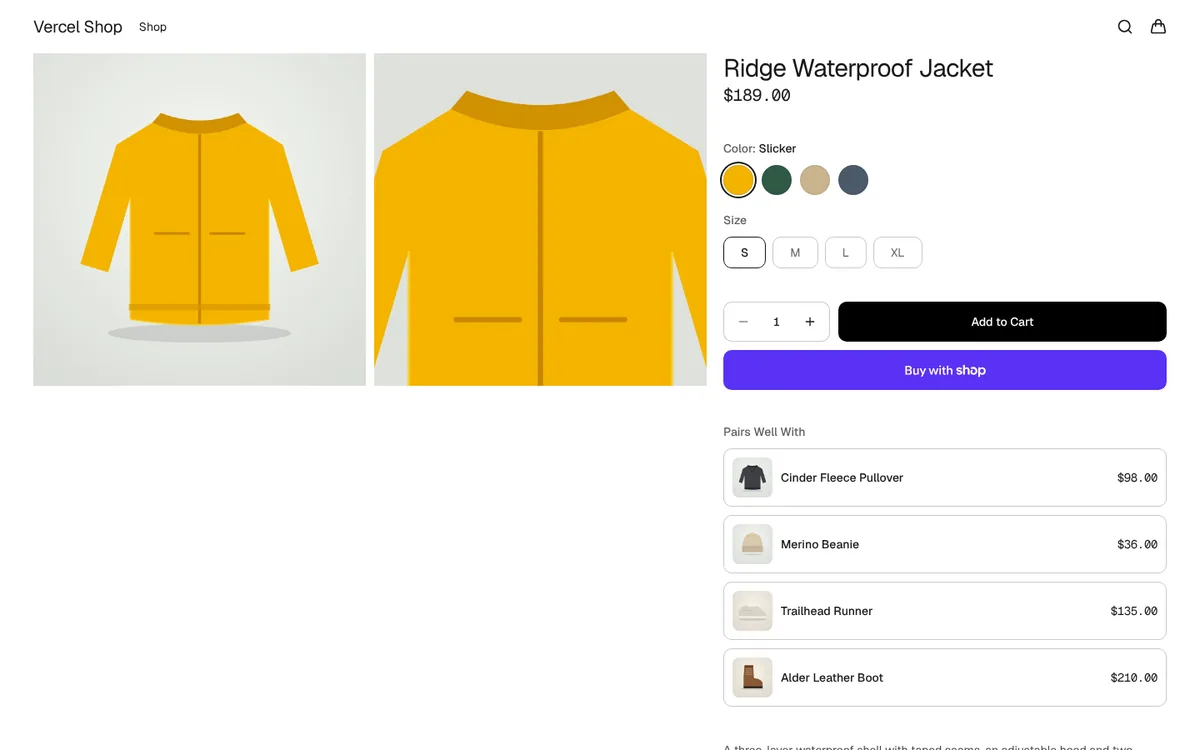
The template as generated: gallery, swatches from the Shopify option values, sizes, Add to Cart, Shop Pay and complementary products.
Two things I learned from this page.
The gallery has a rule about colors. The template shows the selected color's image first, then the images that belong to no color. If every image on a product is tied to a color, it falls back to showing all of them, and the selected color appears twice. My first fixture did exactly that. The fix is a merchant habit: one image per color, plus a few shots that are not tied to any color, such as a detail or a lifestyle photo.
Shopify data is cached hard. Catalog reads use cacheLife("max") with tags. After I fixed a data error, the dev server kept serving the cached "Page Not Found" until I restarted it. On a real store you avoid this by setting SHOPIFY_WEBHOOK_SECRET and configuring webhooks, so edits in Shopify admin refresh the storefront.
Step 4: Add the skills
#New projects include the skills. For an existing storefront, one command adds them. I ran it in an empty directory to check what it does:
pnpm dlx skills add vercel/shop --skill '*' --yesInstalled 8 skills
./.agents/skills/build-shop
./.agents/skills/enable-analytics
./.agents/skills/enable-i18n
./.agents/skills/enable-shopify-markets
./.agents/skills/enable-shopify-menus
./.agents/skills/init-vercel-shop
./.agents/skills/shopify-graphql-reference
./.agents/skills/update-shop
symlinked: Claude Code universal: Amp, Antigravity, Cline, Codex +17 more
Done! Review skills before use; they run with full agent permissions.That last line is worth taking seriously. A skill is instructions plus scripts that your agent follows with your permissions, so read each SKILL.md before you rely on it. I read init-vercel-shop, build-shop and enable-shopify-menus in full. They are plain Markdown and easy to audit, and the table's notes for the others come from the docs and the repository.
| Skill | Use it to | Notes |
|---|---|---|
init-vercel-shop | Scaffold a storefront and connect a Shopify store | Always passes an explicit target directory and never overwrites a non-empty one |
build-shop | Build or change routes, data and rendering | Defines a five-layer model of a route and ends with a browser check and an audit script |
shopify-graphql-reference | Add Storefront or Customer Account GraphQL in the template's layout | Expects Shopify's validation tooling to run first |
enable-analytics | Add Vercel Web Analytics, Speed Insights and Google Tag Manager | Gives you Core Web Vitals field data |
enable-i18n | Locale-prefixed URLs and translations with next-intl, without Markets | For translation without regional pricing |
enable-shopify-markets | Regional locales, currency and localized commerce context | Pairs Shopify Markets with next-intl |
enable-shopify-menus | Replace the hardcoded nav and footer with Shopify menus | Used in step 6 |
update-shop | Upgrade one template release at a time | Keeps you off a diverged fork |
Three more layers of guidance matter:
AGENTS.md. It is the contract. It names the three owners, says commerce facts always come from Shopify, keeps cache policy out of fetch code, and has a rule I like: code, comments and pull requests describe current behavior, not the work that produced it. It also sets a temporary testing policy: no new tests unless asked, and the agent must say which checks were mocked.- Next.js and Hydrogen guidance.
next devmaintains an agent-rules block inAGENTS.mdthat points to version-matched docs innode_modules/next/dist/docs/. The Hydrogen package itself bundles about twenty skills, such ashydrogen-cart-ui,hydrogen-storefront-clientandhydrogen-request-handlers. - Shopify AI Toolkit. The Shop skills expect it for current API docs and GraphQL validation. Read its telemetry section before installing: telemetry is on by default and can include your latest prompt, with a documented opt-out file. I did not install it in the sandbox.
Skills beyond the template. For design I used Anthropic's frontend-design skill (step 5). The Shopify AI Toolkit and the Vercel plugin from the docs cover API facts and platform guidance. An accessibility review skill is worth adding next. I did not run one here, and step 5 says where that leaves the accessibility claims.
If you work in Claude Code, Cursor or Codex, the same skills load. I covered how I design and package my own in two agent skills for mocking UI in the real app.
Step 5: Redesign it with a design skill
#The default storefront is clean and neutral on purpose. To see what the template looks like once someone designs it, I used Anthropic's frontend-design skill with one rule from its own text: write a plan first, check the plan against the usual generated-design defaults, then build and critique from screenshots.
My first pass failed that check. It was a cream background with forest green, three identical rounded trust cards and a tracked all-caps label above the heading. The skill names those as the defaults that make a page look generated, so I threw the pass out and wrote a plan for this shop instead.
| Decision | Choice | Why it fits this shop |
|---|---|---|
| Color | Spruce #0E2B29 ground, slicker yellow #F4B400 as the only accent, fog #E8EDEB page, lichen and rain for panels | Oilskin yellow is the real color of rain gear, and a cool page avoids cream |
| Type | Anybody, a variable-width sans, for headings and UI; Newsreader, a serif, for reading text | Condensed signage type feels like trail markers. A serif gives spec copy a field-notebook voice |
| Hero | An annotated specimen plate: the jacket drawn large over contour lines, with callouts taken from the product copy | It is the most characteristic thing in this shop's world, and the callouts are visible product facts |
| Layout | Left-aligned hero, color-block category plates in one tall and three small sizes, a ruled ledger instead of cards | The boldness lives in two places. The product grid stays quiet |
| Motion | One moment: the contour lines draw in, then the callouts appear | Reduced motion shows the final state with no animation |
| Removed | The all-caps eyebrow, identical cards, the centered stack | They read as templated |
How the plan became code
The template pins its conventions, so most of the redesign is tokens and five small components. Fonts come from the Fontsource packages on npm and load through next/font/local, which keeps them in the repository:
const anybody = localFont({
  declarations: [{ prop: "font-stretch", value: "50% 150%" }],
  display: "swap",
  src: "./fonts/anybody-latin-standard-normal.woff2",
  variable: "--font-anybody",
  weight: "100 900",
});
Because the family has a width axis, two utilities give two cuts of one typeface: an ultra-condensed one for the hero and a more open one for everything else.
@utility font-condensed {
  font-stretch: 58%;
  font-weight: 860;
  letter-spacing: -0.012em;
  line-height: 0.88;
  word-spacing: 0.12em;
}

@utility font-signage {
  font-stretch: 72%;
  font-weight: 720;
  letter-spacing: 0.03em;
  line-height: 0.95;
  word-spacing: 0.1em;
}
The hero has two parts. Contours generates 22 closed curves from sine functions and draws them with pathLength and stroke-dashoffset, behind a motion-safe variant. SpecimenPlate is an inline SVG of the jacket with five callouts, each restating a fact from the product description: the hood, taped seams in three layers, 20,000 mm waterproof and 15,000 g/m² breathable, two zipped hand pockets and 540 g in size M. Below it, the category plates read Shopify collections through the template's cached getCollectionsListing, and the three store promises sit in a ruled ledger.
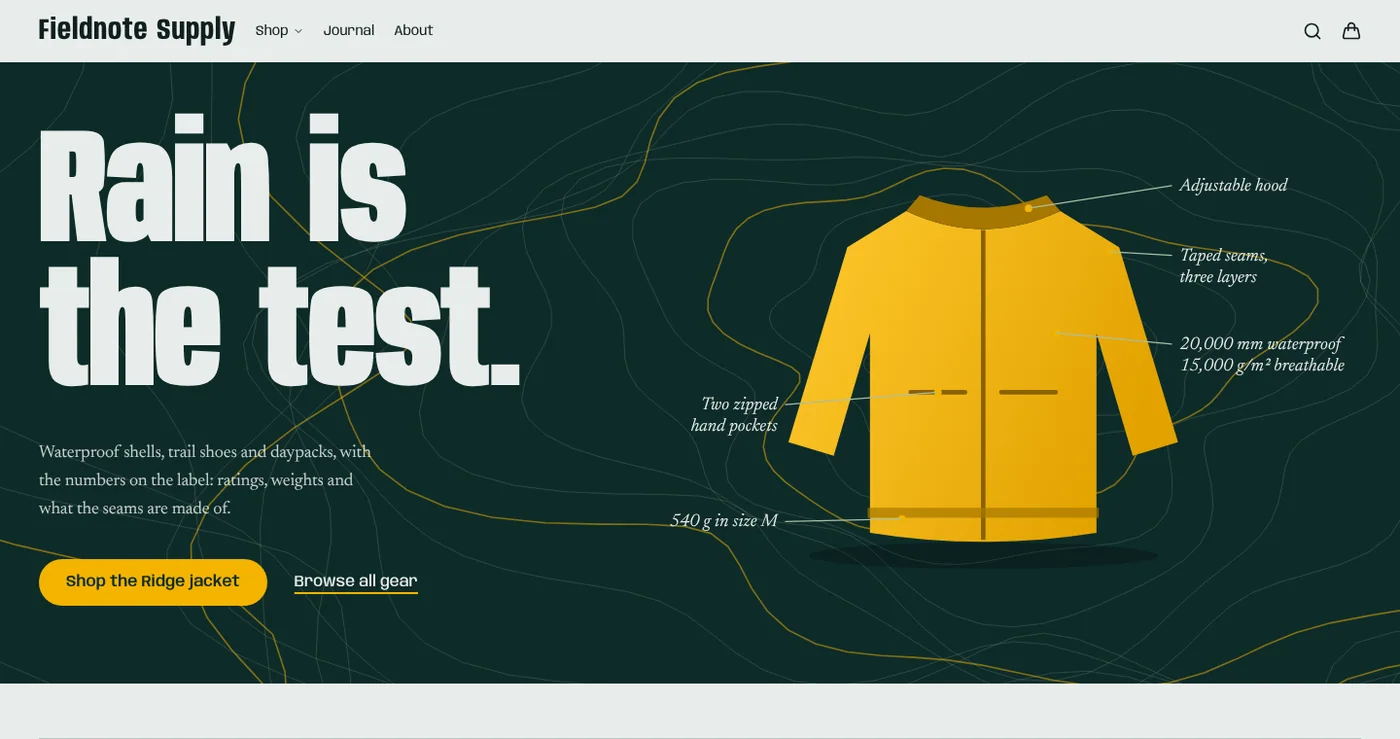
The hero after the contour lines and callouts have played. The type, the jacket and the callouts are the only elements doing the work.
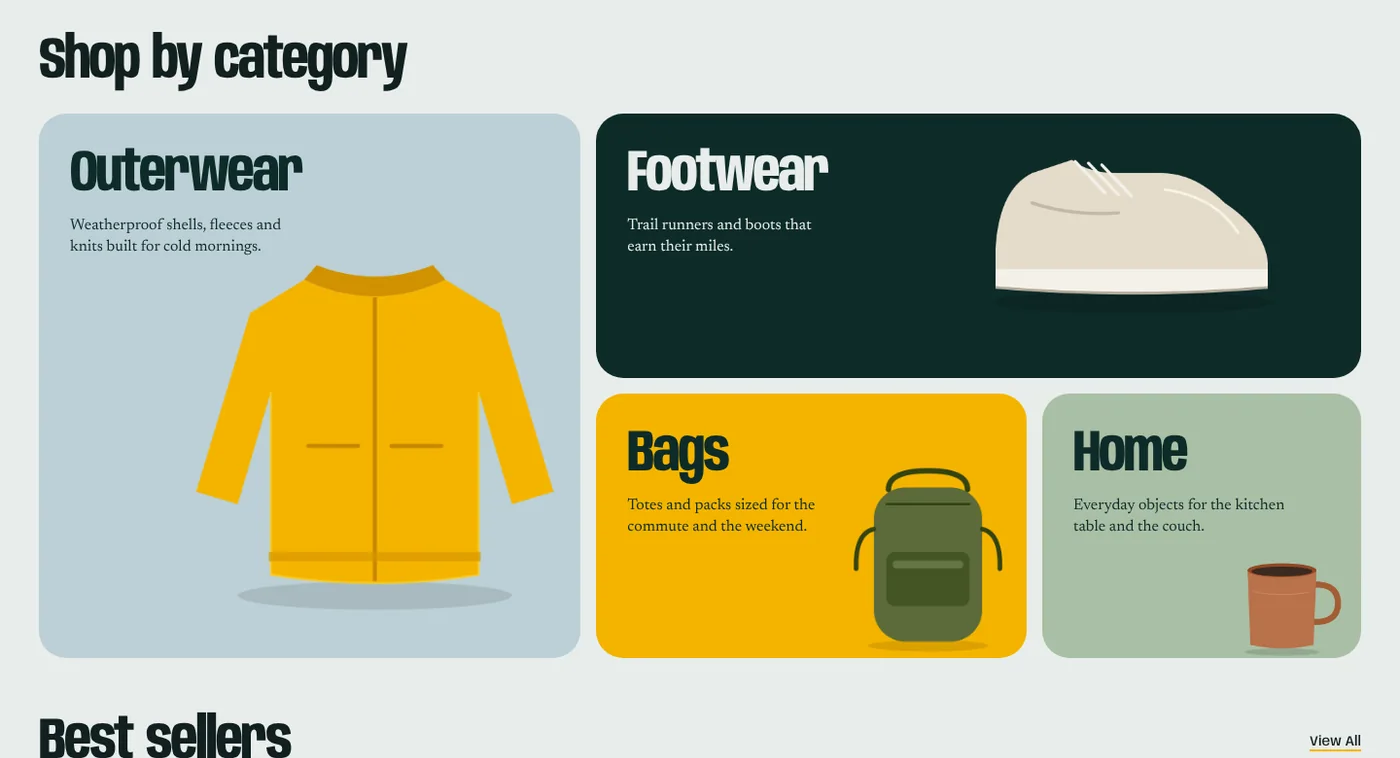
Four panels, four sizes and four colors, with transparent product cutouts. There is no shared card style.
Warning: The hero's callout text and its link to the Ridge jacket are hardcoded. That is fine for a campaign banner, but it breaks the template's rule that commerce facts come from Shopify, which is why the hero shows no price. In production, drive a hero like this from a Shopify metaobject so merchants can change it.
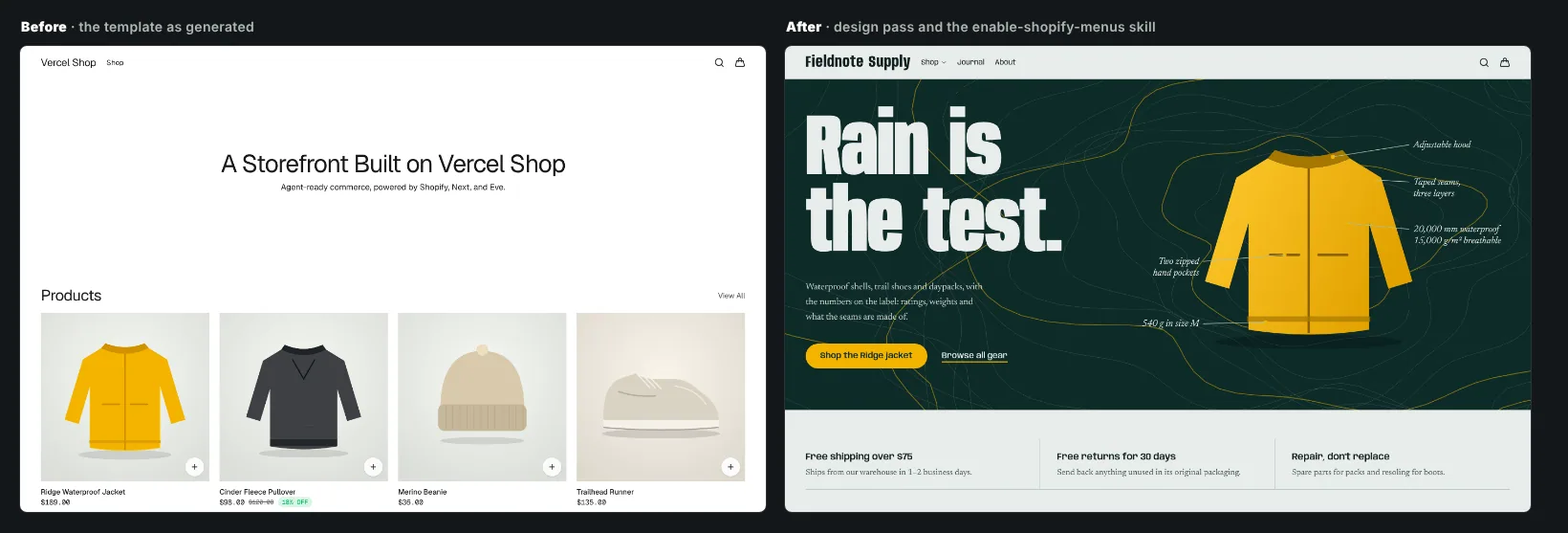
Same template, same catalog, same Shopify data. I re-shot the untouched template against the same catalog so the comparison is fair.
What the screenshots caught
Typecheck, lint and build were green throughout. These are the problems only a look at the page found:
| Problem | Found by | Fix |
|---|---|---|
| Condensed headings lost their word spaces and letters touched | Desktop screenshot | Added word spacing and split the family into the two cuts above |
| The hero callouts rendered at about 9 px on a phone | Mobile screenshot | Crop the plate to the jacket on small screens and list the facts as text |
| The jacket covered the Outerwear copy on mobile | Mobile screenshot | Smaller image and a taller first panel |
| The default focus ring is spruce, so it would vanish on the spruce hero and the Footwear panel | Spotted in review, confirmed by a Tab-through | A light ring on the hero button and a dark outline offset outside each panel |
| The template's Shop dropdown could not be reached by keyboard: Tab skipped its links and focus fell to the page body | Tab-through with focus-event logging | One class in components/nav/quick-links.tsx, explained below |
| After I made the type heavier, the headline wrapped to three lines at 1440 px | Desktop screenshot | Size it from the column width and use two columns from the lg breakpoint |
One tip on method: a screenshot taken while the page animates makes fine details look broken. Wait for the animation to finish before you judge a frame.
The quality floor
The skill asks for a responsive layout, visible keyboard focus, reduced-motion support and readable color, without making a show of it. I checked each one:
- Reduced motion. With the browser set to reduce motion, no SVG node had an animation, and the contours and callouts were visible immediately.
- Keyboard. After the fix below, Tab runs from the skip link through the logo, Shop and its four links, Journal and About, the search and cart buttons, both hero actions and then each category panel. The focus ring was visible on every surface I tested.
- A keyboard bug in the template. Once a nav item has children, as it does after the menus skill, the dropdown opens on hover or while its trigger has
:focus-visible. Pressing Tab moves focus off the trigger, the panel hides at that instant, and the first child link cannot take focus while hidden, so focus drops to the page body and the four category links are skipped. The event log showed afocusoutfrom Shop toward Outerwear and nofocusinafter it. Lettingvisibilityride the same 150 ms transition as opacity, withtransition-[opacity,visibility]in place oftransition-opacity, keeps the panel focusable for the moment focus needs to land. This is upstream template code, so I patched it locally and it is worth reporting to the maintainers. A default store with a single nav link never shows it. - Contrast. I computed the ratios instead of judging by eye. WCAG AA asks for 4.5:1 for body text.
| Pair | Ratio |
|---|---|
| Headline and callouts: fog on spruce | 12.7:1 |
| Body copy: ink on fog | 14.2:1 |
| Hero button: spruce on slicker yellow | 8.1:1 |
| Category panels: spruce on rain, spruce on lichen | 9.4:1, 7.7:1 |
| Footer links: fog at 70% on spruce | 7.0:1 |
| Secondary copy: muted green on fog | 6.3:1 |
Two honest limits. I did not run an accessibility review skill, so this is a spot check and not an audit. And I did not measure Largest Contentful Paint with the new fonts, which total about 336 KB as WOFF2 files (Anybody 57 KB, Newsreader 132 KB, and its italic 147 KB). If you do not need the italic, drop it. Measure with Speed Insights through the enable-analytics skill before you launch.
The whole redesign touched 20 files: three are font files and the rest are 17 source files, with 544 lines added and 64 removed. pnpm typecheck, pnpm lint and a production build passed.
Step 6: Use a skill, enable Shopify menus
#I picked enable-shopify-menus because its result is visible. By default the nav is one hardcoded Shop link and the footer has no columns.
The skill is interactive by design: it asks which menus you want and what their handles are. I took its documented defaults, both menus with the handles main-menu and footer, which every Shopify store starts with. Then the agent followed the steps:
- Added
lib/shopify/operations/menu/server.ts, an uncachedfetchMenuthat turns Shopify's absolute URLs into storefront paths and leaves external links alone. - Added
lib/menu/server.ts, a cachedgetMenuwithcacheLife("max")and themenustag. - Made
Navasync and let the Shopify menu win over the inline default, and did the same forFooter, keeping the inline items as a fallback so a Shopify error never leaves a blank nav.
const items: MenuItem[] = (await getMenu({ handle: "main-menu" }).catch(() => null)) ?? [
  { id: "default-nav-shop", items: [], title: "Shop", url: "/collections/all" },
];
The skill touched two components and added two files. Shopify now owns the link structure.
Shopify sends no webhook when a menu changes, so the menus stay cached until you call POST /api/revalidate?tag=menus with a secret. I ran the skill's own verification with REVALIDATE_SECRET set:
| Request | Result |
|---|---|
| No authorization header | 401 |
| Wrong bearer token | 401 |
| Correct bearer token | 200, {"revalidated":["menus"]} |
The skill says the endpoint returns 404 while the secret is unset. I did not test that case.
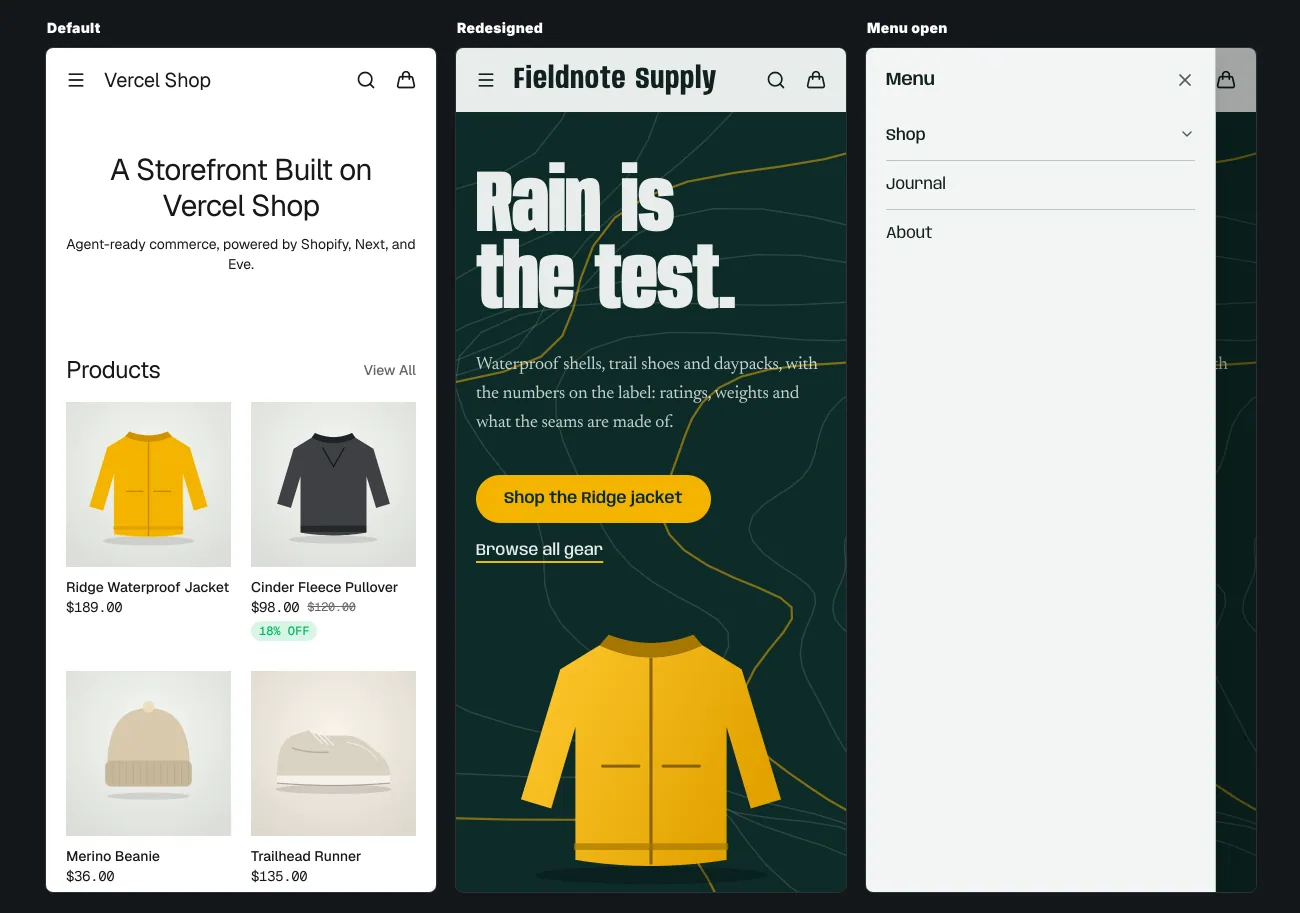
The mobile menu reads the same Shopify menu.
Step 7: Cart and checkout
#The cart is a Hydrogen server handler at /api/cart, not a Server Action, and the cart cookie holds the Shopify cart id. Prices, totals and availability always come from Shopify's response.
In the sandbox, the browser's Add to Cart button failed with Standard Actions not available. Ensure the Shopify script tag has loaded before calling cart actions, and the browser logged a blocked network request. My sandbox only reaches allowed hosts, so I believe Shopify's hosted script was the blocked request. I did not tunnel around it.
I tested the server side instead. A JSON POST to /api/cart with two lines created a cart through the Storefront API, set the cart cookie, and returned a correct total: one $189 jacket plus two $36 beanies is $261. The cart drawer then rendered from that cookie.
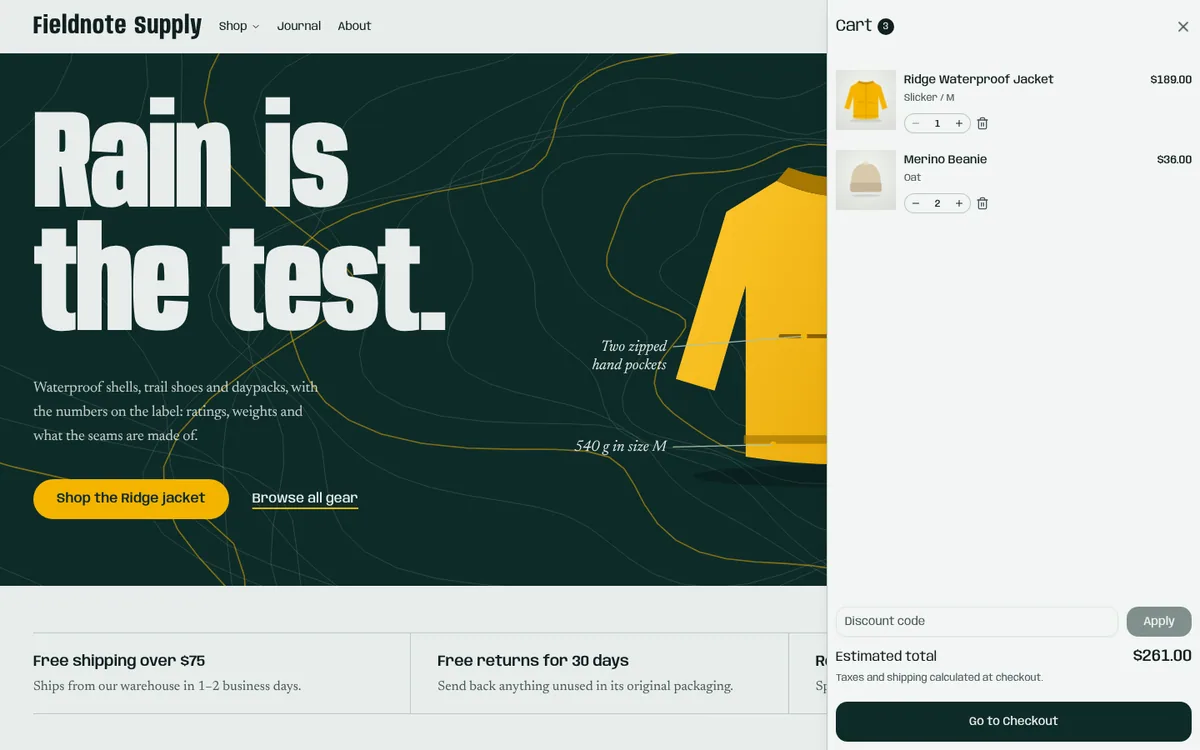
The drawer shows variant details, quantity controls, a discount code field and the estimated total. Checkout is a Shopify URL.
Note: Treat this as server-path evidence, not as a test of the button. Before launch, test Add to Cart, quantity changes, a discount code and a real checkout on a preview deployment, with a real store and Shopify's test mode.
Step 8: Check what search engines and AI agents receive
#This is the part most guides skip. I built for production and read the responses. pnpm build took about 44 seconds, and the route table marks products, collections, pages and policies as Partial Prerender.
HTML for people, Markdown for agents, same URL. A normal request returns HTML. A request with Accept: text/markdown returns this:
HTTP/1.1 200 OK
content-type: text/markdown; charset=utf-8
link: <https://your-store.example/products/ridge-waterproof-jacket>; rel="canonical"
x-robots-tag: noindex
vary: Accept

---
title: "Ridge Waterproof Jacket"
canonical_url: "https://your-store.example/products/ridge-waterproof-jacket"
last_updated: "2026-10-28T09:00:00Z"
---
# Ridge Waterproof Jacket
Fieldnote Supply · Jackets
**$189.00** · In stock
## Options
- **Color**: Forest, Sand, Slate
- **Size**: S, M, L, XL
The canonical header and noindex mean search engines index the shopper page, not its Markdown copy. Appending .md to the URL does the same. For this product, the Markdown was 1,476 bytes and the HTML 209,822 bytes. That ratio comes from a small test catalog, so treat it as an order of magnitude.
/llms.txt is generated from the store: the description, how to buy through UCP, policy links and up to 50 collections. It tells an agent to search with search_catalog, build a cart, and call complete_checkout only after the shopper approves payment.
Crawl rules and sitemap. robots.txt allows the site and blocks the cart, account, login and search pages and sorted or filtered collection URLs, then points to a sitemap index with six shards: static pages, products, collections, pages, blogs and articles.
Structured data. The product page carries four JSON-LD blocks: Organization, WebSite with site search, Product and BreadcrumbList. The titles are clean, for example Ridge Waterproof Jacket | Fieldnote Supply, and the page has one h1, a canonical URL and Open Graph and Twitter tags. I re-ran these checks after the redesign: the home page still has one h1, a descriptive title and meta description, a canonical URL, Organization and WebSite JSON-LD, and every image has an alt attribute, with empty alt text on the four decorative ones.
The gap is in the Product block. It has name, description, image, brand and an Offer with price, currency, availability and URL, and nothing else. sku appears only for single-variant products, there is no variant model, no reviews, and no shipping or return details. Google's product structured data overview says merchant listing markup supports sizing, shipping details and return policy information, so that is where I would add. Here is the shape for the return policy, as an illustration:
{
  "@type": "Offer",
  "price": "189.00",
  "priceCurrency": "USD",
  "availability": "https://schema.org/InStock",
  "hasMerchantReturnPolicy": {
    "@type": "MerchantReturnPolicy",
    "applicableCountry": "US",
    "returnPolicyCategory": "https://schema.org/MerchantReturnFiniteReturnWindow",
    "merchantReturnDays": 30,
    "returnFees": "https://schema.org/FreeReturn"
  }
}
I did not add this to the sandbox template. The values must match your real policy and the visible page, so wire them to a Shopify metafield or a config entry, never to a literal in a component. That also respects the template's rule that commerce facts come from Shopify.
What a Shopify store should contain
#Shopify's store checklist is blunt about the basics: set up shipping, taxes, payment providers and store policies, test the checkout, and finalize policies, contact information and shipping rates before you go live, because the store is public after launch. Tax compliance stays your responsibility, since Shopify calculates tax but does not file it unless you use Shopify Tax. This table adds what a headless storefront needs and where Vercel Shop stands.
| Area | What a store needs | In Vercel Shop |
|---|---|---|
| Catalog | Collections, search, filters, sorting, variant options | Yes: collection, search and product routes with facets and a variant picker |
| Product page | Price, availability, options, 4+ images, specs, size guide, delivery and returns near the button, reviews | Price, availability, options, gallery, Shop Pay and related products. Size guide, reviews and delivery estimates are yours, for example from metafields |
| Cart and checkout | Cart, discount codes, Shopify Checkout, accelerated payment | Yes: drawer, discount field, checkout hand-off, Shop Pay |
| Policies and trust | Refund, shipping, privacy, terms, contact details | Shopify policies render at /policies/* and in the footer. Contact and About live in Shopify Pages |
| Content | About, FAQ, a journal | /pages/* and /blogs/* from Shopify |
| Navigation | Menus, predictive search | Predictive search yes; menus through enable-shopify-menus |
| SEO | Titles, descriptions, canonical URLs, sitemap, robots, structured data | Yes, with the thin Product block to enrich |
| AI readiness | Markdown, llms.txt, crawler access, agent checkout through UCP | Yes, with UCP served by Shopify |
| Performance | LCP 2.5 s or less, INP 200 ms or less, CLS 0.1 or less, measured at the 75th percentile | Architecture helps; measure with enable-analytics |
| International | Currencies, languages, regional pricing | enable-shopify-markets or enable-i18n |
| Compliance | Tax setup, consent, accessibility | Tax in Shopify, consent options in config, accessibility is yours to test |
The performance targets are Google's Core Web Vitals thresholds. On accessibility, the European Accessibility Act has applied to e-commerce services in the EU since 28 June 2025, with an exemption for microenterprises (fewer than 10 employees and under €2 million turnover) that provide services. If you sell to EU consumers, check your status on the European Commission's page, then test keyboard use, focus states, contrast and form labels yourself. A template cannot certify that for you.
What search and AI answers will reward
#Nobody can forecast this precisely, so I separate what the sources say from my reading of them.
What the sources say
- Fundamentals still win. Google's AI features guidance says the same SEO practices apply to AI Overviews and AI Mode, and that there are "no additional technical requirements". Its list: allow crawling (in robots.txt and in your CDN or host), link internally, give a good page experience, keep important content in text, support it with good images and video, make structured data match the visible text, and keep Merchant Center data current. AI traffic is reported inside the Search Console Performance report, in the Web search type.
- Answer engines fan a question out. Shopify's SEO lead explains that an AI search turns one prompt into several sub-queries and synthesizes the results. You are cited if you show up for those sub-queries, which is classic SEO plus mentions on pages the engine retrieves.
- Product facts are citable, copy is not. The same article recommends dimensions, materials, use cases and care written as simple declarative statements, because answer engines favor fact-rich pages.
- Mentions beat claims. Reviews and roundups, communities such as Reddit, affiliate programs that make publishers link to you, and original research that others cite all feed the retrieval step. Pre-purchase tools that a text answer cannot replace, such as a visualizer or size finder, give people a reason to click.
- Agents can transact. UCP, co-developed by Google, Shopify and others, gives agents one way to search a catalog, build a cart and reach checkout, with the business staying merchant of record. Vercel Shop forwards Shopify's endpoints at your own domain.
- Crawler policy is per bot. OpenAI documents separate agents:
OAI-SearchBotfor ChatGPT search results,GPTBotfor training, andChatGPT-Userfor actions a user starts, where robots.txt rules may not apply. You can allow one and block another. Google controls snippets withnosnippet,max-snippetandnoindex, and training and grounding in other systems withGoogle-Extended.
My reading
- Win on product data quality first. Facts in metafields, one image per color, real reviews, and policies in plain words do more than any file in your root.
- Keep
/llms.txtshort. Google's guidance asks for nothing like it, and I found no evidence that it moves citations. It is cheap and the template ships it, so keep it as a courtesy to agents, not as a ranking plan. - Build entity clarity: a consistent brand and author name, an About page that states who you are, and the same facts on every profile that links back to you.
- Measure it as a channel. In Shopify analytics, filter by referrer name such as ChatGPT. Watch the Search Console Performance report. Track a fixed list of prompts by hand each month and note which sources the engines cite.
- Expect agent-driven buying to be normal, so be transactable: accurate availability, clean variants and a checkout that works for a machine.
Recommendations
#- Start with the template, not a port of your theme. Do a design pass and one skill first, then add features. The diff for both was 20 files, with 544 lines added and 64 removed.
- Keep the skills in the repo and read them. They run with your permissions. Add your own skill for your conventions, as the docs suggest for repeated work.
- Verify in a browser, not just in CI. Typecheck, lint and build stayed green while headings collided, a focus ring disappeared and phone labels shrank to 9 px. Look at desktop and phone widths, and say which checks were mocked, as
AGENTS.mddemands. - Use a design skill that makes you plan first. It pushed me off a generic look in one pass. Make the agent write the plan, check it against the defaults, then show screenshots.
- Set up webhooks and the revalidate secret before launch, or you will debug stale pages.
- Turn on the Shop Agent last. The template says to configure AI Gateway access, bot protection and spending safeguards before public chat, because every message can cost model usage.
- Audit your apps. Theme app blocks render only in Shopify themes. For each app you depend on, check that it has a Storefront API or JavaScript path.
- Enrich the structured data with real return and shipping details, GTINs where you have them, and a variant model.
- Baseline before you change. Record Core Web Vitals, your AI referrers and a prompt list, so you can tell what helped.
FAQ
#What is Vercel Shop? An MIT-licensed Next.js storefront template for Shopify with built-in SEO and AI-agent surfaces, eight agent skills and an optional shopping assistant.
Does it replace Shopify? No. Shopify runs the catalog, cart, checkout, payments and customer data. Vercel Shop is the storefront in front of it.
Which versions does it need? The manifest pins Node 26 and pnpm 12.16.1. The tested release was 2026.11.0, on Next.js 16.4.3 and Hydrogen 2026.10.2.
Do I need Hydrogen or Oxygen? You need Hydrogen's framework-agnostic SDK, which the template installs. You do not run the Hydrogen React Router framework, and you deploy to Vercel.
Can I use Claude Code or Cursor? Yes. Any agent that reads AGENTS.md and project skills works, and Claude Code reads .claude/skills.
How do AI agents buy from the store? Through Shopify's UCP endpoints, which the storefront forwards at /.well-known/ucp and /api/ucp/mcp, and through Markdown pages and /llms.txt for discovery. I did not test the UCP endpoints.
Do I need llms.txt? Google says AI features need no extra technical requirements. The template generates one anyway, which costs nothing.
How much of the design can I change? All of it. The visible design is theme tokens, a handful of components and your copy. My redesign touched 20 files and left the commerce, caching and agent layers alone.
How do I keep the template up to date? Use the update-shop skill. It upgrades one release at a time and lets you pick which changes to apply.
Does the shopping assistant cost money? It uses models through Vercel's AI Gateway, so public traffic can incur charges. It is off by default. I did not run it.
Sources
#- Vercel and Shopify make agents first-class shoppers, Vercel
- Vercel Shop documentation, including setup, extending with agents and AEO and GEO
- vercel/shop on GitHub and the live demo
- Hydrogen 2026.10 release and Shopify AI Toolkit, Shopify
- Universal Commerce Protocol
- AEO for ecommerce, Shopify
- AI features and your website and product structured data, Google Search Central
- Web Vitals, web.dev
- OpenAI crawlers overview
- General checklist for starting a new Shopify store, Shopify Help Center
- European Accessibility Act, European Commission